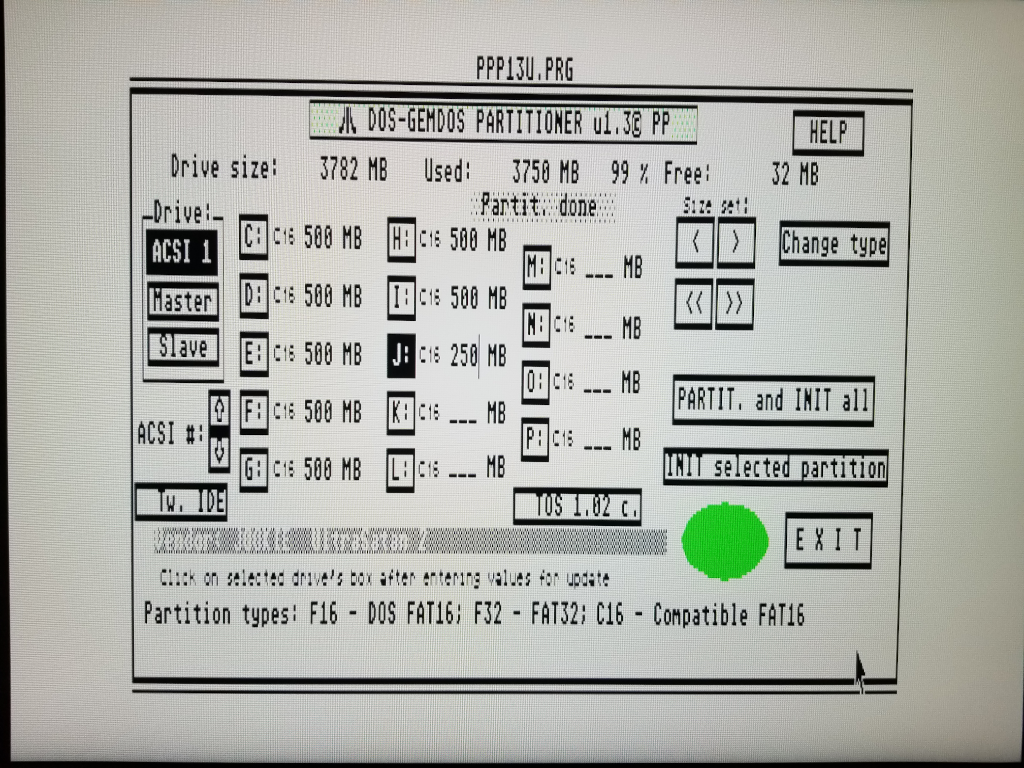
I chose TOS 1.04 and Windows compatibility hoping I could see the partitions from Linux or Windows.
The partitions themselves were all 512MB except the last which I set at 377MB.
Using the actual STE, all the partitions are fine and I can read and write them. Using Windows 7 I can see the first partition and read and write to it. Haven't tried Windows 10 since I think update 1703 is needed to view more than one sd card partition and I haven't updated it.
Under Linux, the card isn't mounted and I can't read the partitions.
The reason for this post is the partition table reported from Linux. I wanted to see if something was wrong since it looks a bit strange. Specifically partition 3 and 4 look odd. Are they correct?
Using "sudo fdisk -l" reports:
Code: Select all
Disk /dev/sdf: 3.71 GiB, 3965190144 bytes, 7744512 sectors
Disk model: SD  Media Reader
Units: sectors of 1 * 512 = 512 bytes
Sector size (logical/physical): 512 bytes / 512 bytes
I/O size (minimum/optimal): 512 bytes / 512 bytes
Disklabel type: dos
Disk identifier: 0x00000000

Device     Boot      Start        End    Sectors   Size Id Type
/dev/sdf1               63     999998     999936 488.3M  6 FAT16
/dev/sdf2           999999    7735517    6735519   3.2G  5 Extended
/dev/sdf3       4282453760 5578974976 1296521217 618.2G  0 Empty
/dev/sdf4                0          0          0     0B  0 Empty
/dev/sdf5          1000062    1999871     999810 488.2M  6 FAT16
/dev/sdf6          1999935    2999744     999810 488.2M  6 FAT16
/dev/sdf7          2999808    3999617     999810 488.2M  6 FAT16
/dev/sdf8          3999681    4999490     999810 488.2M  6 FAT16
/dev/sdf9          4999554    5999363     999810 488.2M  6 FAT16
/dev/sdf10         5999427    6999236     999810 488.2M  6 FAT16
/dev/sdf11         6999300    7735517     736218 359.5M  6 FAT16

Partition table entries are not in disk order.