Partition table on SD Card?

General questions about HDDRIVER/Allgemeine Fragen zu HDDRIVER
TheNameOfTheGame
Posts: 9
Joined: 27 Mar 2022, 15:53

Partition table on SD Card?

Post by TheNameOfTheGame »

I partitioned my 4GB Sandisk SDHC card using HDDriver 10.16 (I still have to install the new version I know).

I chose TOS 1.04 and Windows compatibility hoping I could see the partitions from Linux or Windows.

The partitions themselves were all 512MB except the last which I set at 377MB.

Using the actual STE, all the partitions are fine and I can read and write them. Using Windows 7 I can see the first partition and read and write to it. Haven't tried Windows 10 since I think update 1703 is needed to view more than one sd card partition and I haven't updated it.

Under Linux, the card isn't mounted and I can't read the partitions.

The reason for this post is the partition table reported from Linux. I wanted to see if something was wrong since it looks a bit strange. Specifically partition 3 and 4 look odd. Are they correct?

Using "sudo fdisk -l" reports:

Code: Select all

Disk /dev/sdf: 3.71 GiB, 3965190144 bytes, 7744512 sectors
Disk model: SD  Media Reader
Units: sectors of 1 * 512 = 512 bytes
Sector size (logical/physical): 512 bytes / 512 bytes
I/O size (minimum/optimal): 512 bytes / 512 bytes
Disklabel type: dos
Disk identifier: 0x00000000

Device     Boot      Start        End    Sectors   Size Id Type
/dev/sdf1               63     999998     999936 488.3M  6 FAT16
/dev/sdf2           999999    7735517    6735519   3.2G  5 Extended
/dev/sdf3       4282453760 5578974976 1296521217 618.2G  0 Empty
/dev/sdf4                0          0          0     0B  0 Empty
/dev/sdf5          1000062    1999871     999810 488.2M  6 FAT16
/dev/sdf6          1999935    2999744     999810 488.2M  6 FAT16
/dev/sdf7          2999808    3999617     999810 488.2M  6 FAT16
/dev/sdf8          3999681    4999490     999810 488.2M  6 FAT16
/dev/sdf9          4999554    5999363     999810 488.2M  6 FAT16
/dev/sdf10         5999427    6999236     999810 488.2M  6 FAT16
/dev/sdf11         6999300    7735517     736218 359.5M  6 FAT16

Partition table entries are not in disk order.
uweseimet
Site Admin
Posts: 408
Joined: 10 Jan 2010, 15:39

Re: Partition table on SD Card?

Post by uweseimet »

Up to date Linux distributions/kernels unfortunately only have limited supported for TOS/Windows compatible partitions. This is caused by Linux checking the root sector content more thoroughly than it did some years ago.
Please see the data exchange page for details and potential solutions.
TheNameOfTheGame
Posts: 9
Joined: 27 Mar 2022, 15:53

Re: Partition table on SD Card?

Post by TheNameOfTheGame »

I see, thanks.

Would you know with which kernel versions this stopped be viable? I can always set up a virtual machine with an older linux version.
uweseimet
Site Admin
Posts: 408
Joined: 10 Jan 2010, 15:39

Re: Partition table on SD Card?

Post by uweseimet »

I´m afraid I don´t know the kernel version, but Christian Zietz identified the responsible change: https://github.com/torvalds/linux/blob/ ... dos.c#L615.
TheNameOfTheGame
Posts: 9
Joined: 27 Mar 2022, 15:53

Re: Partition table on SD Card?

Post by TheNameOfTheGame »

Something interesting I found regarding this.

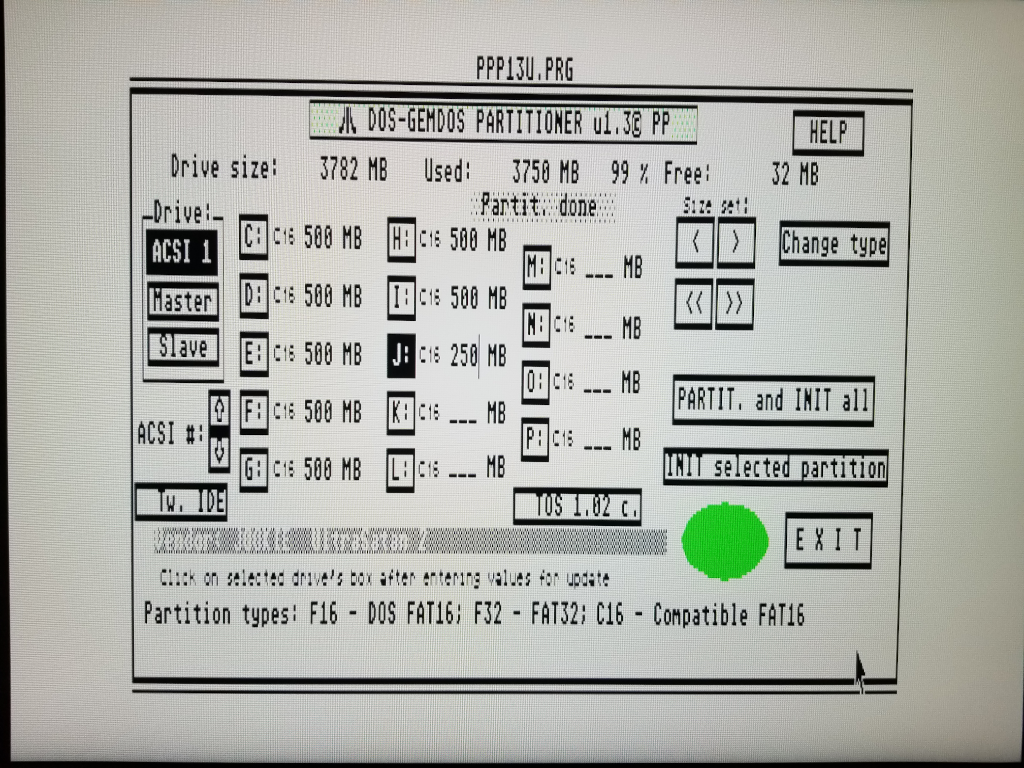
Using Peter Putnik's partitioner, Linux can mount and access all the sd card partitions. However, HDDriver cannot access the partitions on the Atari computer (of course Peter's driver works with them).

Looking at the paritions between hddriver and ppdriver, hddriver marks the paritions it makes as D16 and Peter's marks them as C16.

So there should be a way to have HDDriver parition the sd card so that Linux can access them.
uweseimet
Site Admin
Posts: 408
Joined: 10 Jan 2010, 15:39

Re: Partition table on SD Card?

Post by uweseimet »

Not sure what you mean with C16/D16. Can you please explain?
TheNameOfTheGame
Posts: 9
Joined: 27 Mar 2022, 15:53

Re: Partition table on SD Card?

Post by TheNameOfTheGame »

Yes, here is a screenshot from Peter's partitioner. As you can see, the paritions have a C16 ID. The card I partitioned with HDDRUTIL (windows compatible) shows up as D16 types when loaded in the partitioner.

Image

Btw, I sent you a link to a blank SD card image via email. It was partitioned with Peter's tool. Maybe you could see a way to give HDDRUTIL a "Linux compatible" option in a future release.

Regards,
Jeff

*Edit* - seems as if the image link above isn't working. I will send the picture to you via email.
uweseimet
Site Admin
Posts: 408
Joined: 10 Jan 2010, 15:39

Re: Partition table on SD Card?

Post by uweseimet »

I'm afraid I still don't know what C16 or D16 is. These are not terms used in the Atari hard disk terminology. Anyway, from what Christian found, the issue with Linux (starting with a particular kernel version) is related to the validation of partition data failing when both TOS and DOS partition data are present on the root sector. This is not the case on the SD card image you provided.

I checked the root sector of this image: It is a regular DOS (but not TOS) compatible root sector with two DOS partitions (ID $06) and an extended DOS partition (ID $0f) on it (see screenshot). There are no TOS compatible partition data (GEM, BGM or XGM). If there are also TOS data somewhere, these data are not organized in an AHDI compatible but in some proprietary way and thus require a proprietary driver in order to be usable.

For HDDRIVER it is important not to be proprietary, but to be fully compatible with standards, in particular AHDI, XHDI and the SCSI Driver. I don't intend to support any proprietary partitioning layouts. Hard disk tools for the Atari have no issues dealing with HDDRIVER's TOS/Windows compatible partitioning (even AHDI can use such a drive), but they won't find any TOS partitions on your image.
'
You do not have the required permissions to view the files attached to this post.
TheNameOfTheGame
Posts: 9
Joined: 27 Mar 2022, 15:53

Re: Partition table on SD Card?

Post by TheNameOfTheGame »

That's interesting. I guess for me then the best solution is to use Peter's driver on my STE and HDDriver on my Falcon and Hades. Sounds like a win-win.

Thanks for taking a look at it.